Share your extension
GDevelop extensions are created and shared by the community.
If you have created a reusable behavior that can be useful in more than one game, or a set of actions/conditions/expressions, consider sharing them with the community! Doing so is very easy.
Export your extension
Open your extension from the Project Manager. At the top of the list of functions, you can see a button "Edit Extension Options". Click on it to open the configuration of the extension:
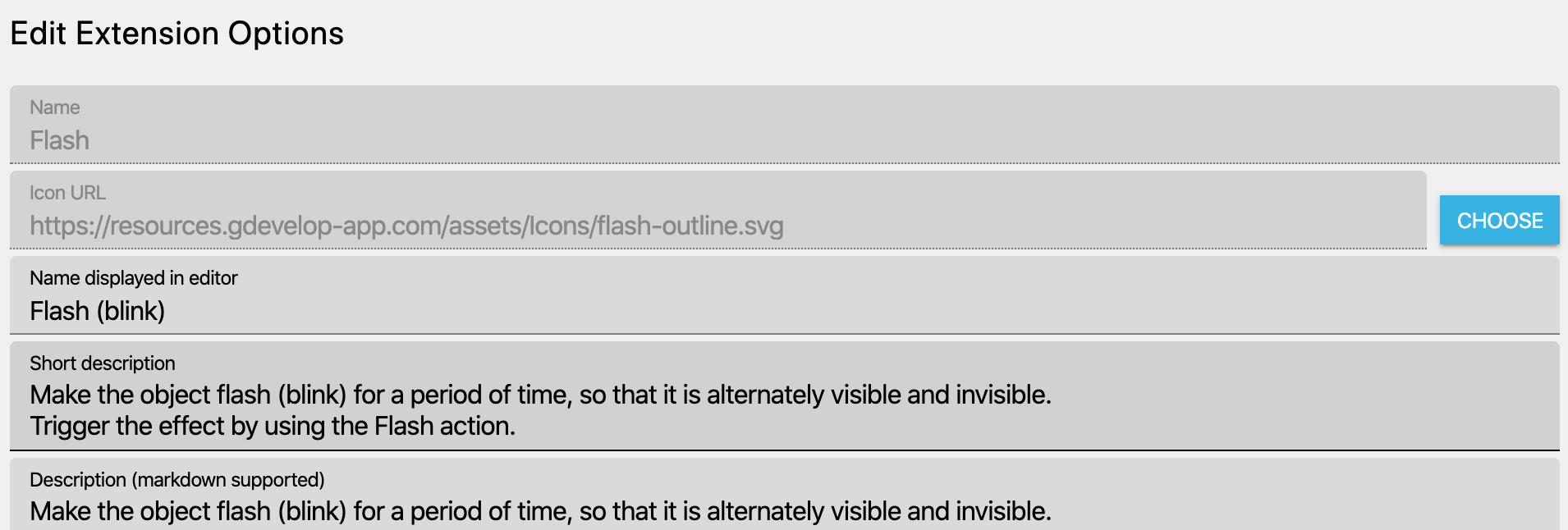
Complete the extension information
Fill all the fields, in particular, the name and the descriptions of your extension:
- The name will be displayed in the search (and will be useful for people to search for your extension),
- The short description will also be displayed in the search results, along with the icon. If your extension contains multiple behaviors or custom objects, each one can also have its own individual icon and help page link (configured in its own options editor),
- The description will be displayed when installing the extension. It should contain a quick explanation about how to use the extension.
- The version is a version number, in the format
X.Y.Z. For example:1.0.0. Start with 1.0.0 if you're confident that your extension is ready, or0.0.1if it's still subject to changes. - Tags is a list of comma-separated "tags", that help to search the extension. Read the existing tags when you search for extensions to get some inspiration. Reuse existing tags as possible.
- Author is your username. An account will have to be registered and a proper username will be needed to be able to add the username. Type the username and pick the username from the drop-down menu
- Dimension indicates whether the extension works in 2D, 3D, 2D/3D, or is not applicable to a specific dimension. Set this to help users quickly identify compatibility.
Ensure your extension follow the best practices
Read the best practices for extensions here.
Export the extension to a .json file
Once you're done, click on "Export Extension" at the bottom, then on "Export to a File".
Choose a file and enter the same name as your extension, finishing by .json. For example: Flash.json.
Share your extension with the community
The easiest way to share your extension is to add it to the GDevelop Community List. Upload your extension on a page where people can learn about it and download it (for example on itch.io or GitHub), then fill the submission form with a link to this page. You will need a GitHub profile.
Extensions of the community list are not reviewed by the GDevelop extensions team. This is also a good place for your extension while you keep improving it.
Submit an official or experimental extension
Official and experimental extensions are available directly in GDevelop, in the list of extensions. They are hosted on the GDevelop-extensions repository and reviewed by the GDevelop extensions team. They are submitted with a pull request:
- Fork the repository. You will need a GitHub profile.
- Add your
.jsonfile to theextensions/communityfolder of your fork. To update an existing extension, replace its file instead. You can do this from your browser, with "Add file" > "Upload files": there is no need to install Git. - Open a pull request and fill in the template. To help the reviewer understand your extension, include a video, screenshots, or an example project (as a ZIP file) that demonstrates what your extension does.
Note
The pull request automatically checks that the extension follows the best practices, for example that all the descriptions are filled. If the checks fail, click on "Details" next to the "Check extensions" check to see the errors. Fix them in GDevelop, export the extension again and upload the new file to the same branch: the pull request is updated.
Your extension will get reviewed to ensure high quality and a good experience for GDevelop users. It is common for the reviewer to request changes, so don't feel discouraged if this happens to you! Once your extension passes the final review, it will be added to GDevelop. The extension will become available immediately and will not have to wait for a new version of GDevelop to be released.
To report a bug or get help with an extension, use the GDevelop forum.